

7. アンチエイリアシング
Ray Tracing in One Weekend (v3.2.3): 7 Antialiasing / 1.7 アンチエイリアシング
前章でシーンが完成しました。しかし,球の輪郭をよく見るとギザギザした「ジャギー」が目立ちます。これはピクセルの色を1本のレイだけで決定しているためです。この章では,各ピクセルに複数のサンプルを放って色を平均する「スーパーサンプリング」によるアンチエイリアシングを実装します。
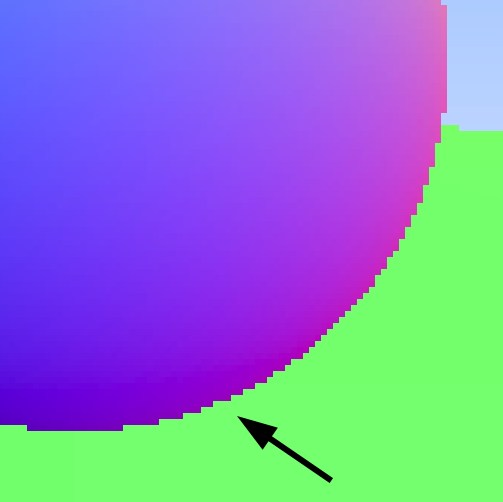
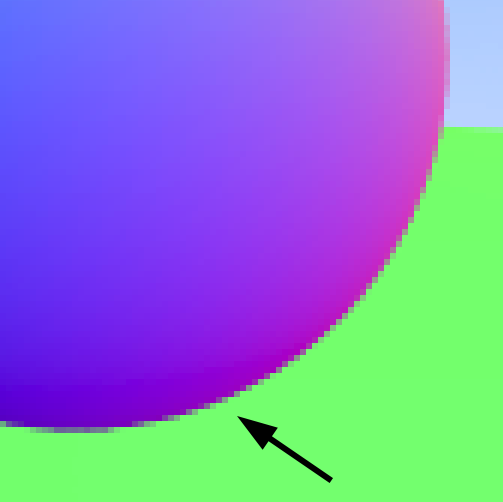
アンチエイリアスの有無
ジャギーの原因
1ピクセルを1本のレイで計算する場合,そのレイが物体の内側に当たれば「物体の色」,外側に当たれば「背景の色」になります。境界線上のピクセルは 0 か 1 の二値しかとれず,これがジャギーの原因です。
実際のカメラでは,シャッターが開いている間に境界線付近の光が混ざり合い,自然にぼかしが生じます。これを再現するために,1ピクセルあたり複数のレイをわずかにランダムにずらして放ち,色を平均します。
乱数の準備
C++ の乱数
原典は rand() と RAND_MAX を使い [0, 1) の乱数を生成します。C++11 以降はより高品質な <random> ヘッダが用意されています。
#include <random>
inline double random_double() {
    static std::uniform_real_distribution<double> distribution(0.0, 1.0);
    static std::mt19937 generator;
    return distribution(generator);
}
個人的には,乱数に関しては「カルドセプト サーガ」における不具合が想起されます。開発者が採用した疑似乱数生成器は,周期が短く,分布の偏りも大きいものでした。さらに,複数の処理が同一のシード系列に基づく乱数を参照するという不適切な実装が重なったことで,同じ結果が不自然に連続したり,先攻有利の傾向が固定化したりするなど,ゲーム体験に明確な悪影響を及ぼしました。おそらく,線形合同法の低次ビットを取り出して用いていたのではないかとも指摘されています。C++11の<random>では,メルセンヌ・ツイスタをはじめとするPRNGが実装されており,標準ライブラリを使用する限り,通常の用途であれば速度,メモリ使用量,周期等の点で大きな支障はない状況となりました。しかし,「カルドセプト サーガ」の開発時期である2006年前後には,そのような実装はまだBoost C++ Librariesにのみ存在していました。
Rust の乱数(Xorshift64)
Rust の標準ライブラリには乱数生成器が含まれていません(!)。外部クレートを使う方法もありますが,ここでは WASM との相性が良いXorshift64アルゴリズムを実装します。
Xorshift はビット演算のみで構成された高速な疑似乱数生成器です。数学的には「線型フィードバックシフトレジスタ(LFSR)」の一種で,統計的性質が良く,レイトレーシング程度の用途には十分な品質を持ちます。
use std::cell::Cell;

thread_local! {
    static RNG_STATE: Cell<u64> = Cell::new(0x123456789abcdef0);
}

pub fn random_double() -> f64 {
    RNG_STATE.with(|state| {
        let mut s = state.get();
        s ^= s << 13;   // XOR
        s ^= s >> 7;    // Shift
        s ^= s << 17;   // XOR
        state.set(s);
        // Convert the top 53 bits to a floating-point value in [0, 1)
        (s >> 11) as f64 * (1.0 / (1u64 << 53) as f64)
    })
}

pub fn random_double_range(min: f64, max: f64) -> f64 {
    min + (max - min) * random_double()
}
thread_local! はスレッドローカルな変数を宣言するマクロです。WASM はシングルスレッドなので,これは実質的にグローバル変数として機能します。Cell<T> は内部可変性(interior mutability)を提供する型で,&self から値を書き換えることを可能にします。
Camera 構造体
カメラの設定は 1.4 以降,毎回レンダリング関数内に直接書いてきました。この章ではカメラをまとめた構造体 Camera を導入します。
C++ の実装です。
class camera {
  public:
    camera() {
        double aspect_ratio = 16.0 / 9.0;
        double viewport_height = 2.0;
        double viewport_width = aspect_ratio * viewport_height;
        double focal_length = 1.0;

        origin = point3(0, 0, 0);
        horizontal = vec3(viewport_width, 0, 0);
        vertical = vec3(0, viewport_height, 0);
        lower_left_corner = origin - horizontal/2 - vertical/2 - vec3(0, 0, focal_length);
    }

    ray get_ray(double u, double v) const {
        return ray(origin, lower_left_corner + u*horizontal + v*vertical - origin);
    }

  private:
    point3 origin;
    point3 lower_left_corner;
    vec3 horizontal;
    vec3 vertical;
};
Rust の実装です。
pub struct Camera {
    origin: Point3,
    lower_left_corner: Point3,
    horizontal: Vec3,
    vertical: Vec3,
}

impl Camera {
    pub fn new() -> Self {
        let aspect_ratio = 16.0_f64 / 9.0;
        let viewport_height = 2.0_f64;
        let viewport_width = aspect_ratio * viewport_height;
        let focal_length = 1.0_f64;

        let origin = Point3::new(0.0, 0.0, 0.0);
        let horizontal = Vec3::new(viewport_width, 0.0, 0.0);
        let vertical = Vec3::new(0.0, viewport_height, 0.0);
        let lower_left_corner =
            origin - horizontal / 2.0 - vertical / 2.0 - Vec3::new(0.0, 0.0, focal_length);

        Camera { origin, lower_left_corner, horizontal, vertical }
    }

    pub fn get_ray(&self, u: f64, v: f64) -> Ray {
        Ray::new(
            self.origin,
            self.lower_left_corner + u * self.horizontal + v * self.vertical - self.origin,
        )
    }
}
write_color の更新
アンチエイリアシングでは複数サンプルの色の合計を write_color に渡し,関数内でサンプル数で割って平均を取ります。あわせて clamp で値が [0, 1) からはみ出さないように制限します。
clamp について
C++ では rtweekend.h に以下を追加します。
inline double clamp(double x, double min, double max) {
    if (x < min) return min;
    if (x > max) return max;
    return x;
}
Rust では f64 に clamp メソッドが標準で組み込まれています。
let r = r.clamp(0.0, 0.999);旧 write_color と新 write_color の比較
以前の実装は 1 サンプル固定でした。
// Old (chapters 1.2 through 1.6)
pub fn write_color(pixel_color: Color) -> String {
    let ir = (255.999 * pixel_color.x()) as i32;
    let ig = (255.999 * pixel_color.y()) as i32;
    let ib = (255.999 * pixel_color.z()) as i32;
    format!("{} {} {}", ir, ig, ib)
}
新実装では samples_per_pixel を受け取り,スケールと clamp を適用します。
C++ の実装です。
void write_color(std::ostream& out, const color& pixel_color, int samples_per_pixel) {
    auto r = pixel_color.x();
    auto g = pixel_color.y();
    auto b = pixel_color.z();

    auto scale = 1.0 / samples_per_pixel;
    r *= scale;
    g *= scale;
    b *= scale;

    out << static_cast<int>(256 * clamp(r, 0.0, 0.999)) << ' '
        << static_cast<int>(256 * clamp(g, 0.0, 0.999)) << ' '
        << static_cast<int>(256 * clamp(b, 0.0, 0.999)) << '\n';
}
Rust の実装です。
/// Averages `pixel_color` over `samples_per_pixel` samples and converts to an "R G B" string.
pub fn write_color(pixel_color: Color, samples_per_pixel: i32) -> String {
    let scale = 1.0 / samples_per_pixel as f64;
    let r = (pixel_color.x() * scale).clamp(0.0, 0.999);
    let g = (pixel_color.y() * scale).clamp(0.0, 0.999);
    let b = (pixel_color.z() * scale).clamp(0.0, 0.999);
    let ir = (256.0 * r) as i32;
    let ig = (256.0 * g) as i32;
    let ib = (256.0 * b) as i32;
    format!("{} {} {}", ir, ig, ib)
}
samples_per_pixel = 1 のときは以前と同じ結果になります。
write_color のシグネチャが変わるため,以前の章のクレート(r103-vec3 〜 r106-hittable-list)はwrite_color(pixel_color) から write_color(pixel_color, 1) への更新が必要です。
レンダリングループの更新
C++ の更新後のメインループです。
int samples_per_pixel = 100;
camera cam;

for (int j = image_height - 1; j >= 0; j--) {
    for (int i = 0; i < image_width; i++) {
        color pixel_color(0, 0, 0);
        for (int s = 0; s < samples_per_pixel; s++) {
            auto u = (i + random_double()) / (image_width  - 1);
            auto v = (j + random_double()) / (image_height - 1);
            ray r = cam.get_ray(u, v);
            pixel_color += ray_color(r, world);
        }
        write_color(std::cout, pixel_color, samples_per_pixel);
    }
}
Rust の実装です。
for j in (0..image_height).rev() {
    for i in 0..image_width {
        let mut pixel_color = Color::new(0.0, 0.0, 0.0);
        for _ in 0..samples_per_pixel {
            let u = (i as f64 + random_double()) / (image_width - 1) as f64;
            let v = (j as f64 + random_double()) / (image_height - 1) as f64;
            let r = camera.get_ray(u, v);
            pixel_color += ray_color(&r, &world);
        }
        output.push_str(&format!("{}\n", write_color(pixel_color, samples_per_pixel)));
    }
}
サンプルループの変数に _ プレフィックス(for _ in)を使っているのは,ループカウンタを使わないことを Rust コンパイラに伝えるためです。使わない変数に名前をつけると警告(unused variable)が出ます。
C++ と Rust の比較
| 機能 | C++ | Rust |
|---|---|---|
| 乱数 | rand() / std::mt19937 | Xorshift64(自前実装) |
| カメラ | class camera | struct Camera + impl |
clamp | 自前実装(rtweekend.h) | f64::clamp メソッド(標準) |
| 未使用変数 | 警告なし(通常) | _ プレフィックスで抑制 |
common クレートへの追加
Camera 構造体と乱数ユーティリティは以降の章でも使うため common クレートに追加します。
common/src/camera.rs
use crate::vec3::{Point3, Vec3};
use crate::ray::Ray;

/// A pinhole camera with a fixed 16:9 aspect ratio.
pub struct Camera {
    origin: Point3,
    lower_left_corner: Point3,
    horizontal: Vec3,
    vertical: Vec3,
}

impl Camera {
    /// Creates a camera with a fixed 16:9 aspect ratio.
    pub fn new() -> Self {
        let aspect_ratio = 16.0_f64 / 9.0;
        let viewport_height = 2.0_f64;
        let viewport_width = aspect_ratio * viewport_height;
        let focal_length = 1.0_f64;

        let origin = Point3::new(0.0, 0.0, 0.0);
        let horizontal = Vec3::new(viewport_width, 0.0, 0.0);
        let vertical = Vec3::new(0.0, viewport_height, 0.0);
        let lower_left_corner =
            origin - horizontal / 2.0 - vertical / 2.0 - Vec3::new(0.0, 0.0, focal_length);

        Camera { origin, lower_left_corner, horizontal, vertical }
    }

    /// Returns a ray for the given `(u, v)` viewport coordinates in [0, 1].
    pub fn get_ray(&self, u: f64, v: f64) -> Ray {
        Ray::new(
            self.origin,
            self.lower_left_corner + u * self.horizontal + v * self.vertical - self.origin,
        )
    }
}
common/src/utils.rs
use std::cell::Cell;

/// Floating-point infinity.
pub const INFINITY: f64 = f64::INFINITY;
/// The mathematical constant π.
pub const PI: f64 = std::f64::consts::PI;

/// Converts degrees to radians.
pub fn degrees_to_radians(degrees: f64) -> f64 {
    degrees * PI / 180.0
}

thread_local! {
    static RNG_STATE: Cell<u64> = Cell::new(0x123456789abcdef0);
}

/// Returns a random f64 in the range `[0, 1)`.
pub fn random_double() -> f64 {
    RNG_STATE.with(|state| {
        let mut s = state.get();
        s ^= s << 13;
        s ^= s >> 7;
        s ^= s << 17;
        state.set(s);
        (s >> 11) as f64 * (1.0 / (1u64 << 53) as f64)
    })
}

/// Returns a random f64 in the range `[min, max)`.
pub fn random_double_range(min: f64, max: f64) -> f64 {
    min + (max - min) * random_double()
}common/src/lib.rs(更新)
pub mod vec3;
pub use vec3::{Color, Point3, Vec3, cross, dot, unit_vector, write_color};

pub mod ray;
pub use ray::Ray;

pub mod hittable;
pub use hittable::{HitRecord, Hittable};

pub mod sphere;
pub use sphere::Sphere;

pub mod hittable_list;
pub use hittable_list::HittableList;

pub mod camera;
pub use camera::Camera;

pub mod utils;
pub use utils::{INFINITY, PI, degrees_to_radians, random_double, random_double_range};
r107-antialiasing クレートの実装
r107-antialiasing/Cargo.toml を用意します。
[package]
name = "r107-antialiasing"
version = "0.1.0"
edition = "2024"

[dependencies]
common = { workspace = true }
r107-antialiasing/src/lib.rs の完全な実装です。
use common::{
    Camera, Color, Hittable, HittableList, Point3, Sphere,
    unit_vector, write_color, Ray, random_double,
};

fn ray_color(r: &Ray, world: &dyn Hittable) -> Color {
    if let Some(rec) = world.hit(r, 0.0, f64::INFINITY) {
        return 0.5 * (rec.normal + Color::new(1.0, 1.0, 1.0));
    }
    let unit_direction = unit_vector(r.direction());
    let t = 0.5 * (unit_direction.y() + 1.0);
    (1.0 - t) * Color::new(1.0, 1.0, 1.0) + t * Color::new(0.5, 0.7, 1.0)
}

pub fn render_image() -> String {
    // Image dimensions
    let aspect_ratio = 16.0_f64 / 9.0;
    let image_width = 384_i32;
    let image_height = (image_width as f64 / aspect_ratio) as i32;
    let samples_per_pixel = 100_i32;

    // World
    let mut world = HittableList::new();
    world.add(Box::new(Sphere::new(Point3::new(0.0, 0.0, -1.0), 0.5)));
    world.add(Box::new(Sphere::new(Point3::new(0.0, -100.5, -1.0), 100.0)));

    // Camera
    let camera = Camera::new();

    // Render
    let mut output = String::new();
    output.push_str("P3\n");
    output.push_str(&format!("{} {}\n", image_width, image_height));
    output.push_str("255\n");

    for j in (0..image_height).rev() {
        for i in 0..image_width {
            let mut pixel_color = Color::new(0.0, 0.0, 0.0);
            for _ in 0..samples_per_pixel {
                let u = (i as f64 + random_double()) / (image_width - 1) as f64;
                let v = (j as f64 + random_double()) / (image_height - 1) as f64;
                let r = camera.get_ray(u, v);
                pixel_color += ray_color(&r, &world);
            }
            output.push_str(&format!("{}\n", write_color(pixel_color, samples_per_pixel)));
        }
    }

    output
}
WASM エクスポート
raytracing-demos/src/lib.rs に追記します。
// Chapter 1.7: Antialiasing
#[wasm_bindgen]
pub fn render_antialiasing() -> String {
    r107_antialiasing::render_image()
}