

補講:ネイティブ並列レンダラー
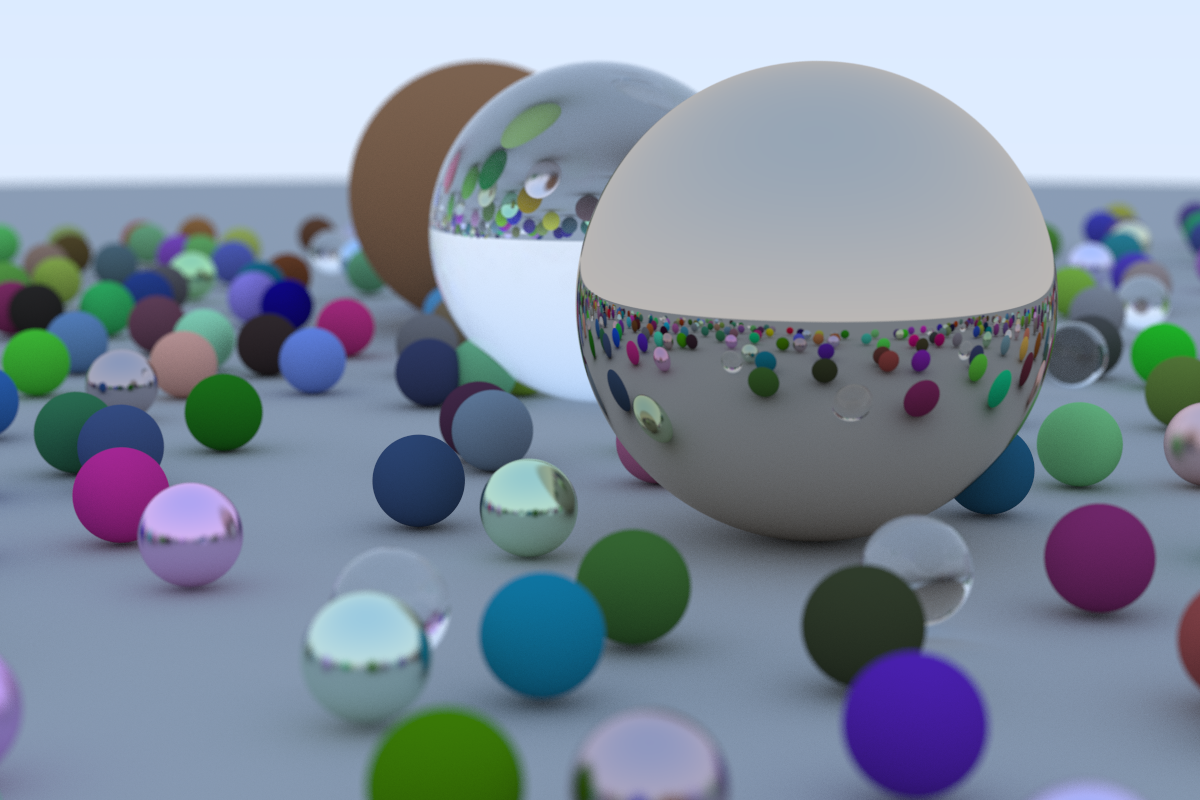
1200x800 pixels, 500 samples/px(12スレッドで約4 分)
これまでの実装はすべて WebAssembly(WASM)として動かすことを前提にしていました。WASM はシングルスレッドの同期実行であるため,上の図のような1200×800ピクセル・500 samples/px の最終シーンはブラウザ上では 30 分以上かかります。
この補講では,r113-final-scene-hq のコードを出発点に,ネイティブ実行・PNG 出力・マルチスレッド並列化に対応した独立プログラムを作ります。レイトレーシングのアルゴリズムは一切変更しません。
/
├── Cargo.toml
└── src/
    ├── main.rs          # CLI・並列ループ・PNG 保存
    └── rt/              # common クレートを移植
        ├── mod.rs
        ├── vec3.rs
        ├── ray.rs
        ├── utils.rs
        ├── hittable.rs
        ├── hittable_list.rs
        ├── sphere.rs
        ├── material.rs
        └── camera.rs
WASM 版からの変更点
追加した依存クレート
[package]
name = "raytracing-book1-final-scene"
version = "0.1.0"
edition = "2024"

[dependencies]
clap  = { version = "4", features = ["derive"] }
image = "0.25"
rayon = "1"| クレート | 用途 |
|---|---|
clap | コマンドラインオプションの解析 |
image | PNG ファイルの出力 |
rayon | データ並列(マルチスレッド)ループ |
WASM 版では wasm-bindgen が必要でしたが,ネイティブ版では不要です。common クレートへの依存もなく,該当コードを src/rt/ に直接移植しています。
出力形式:PPM → PNG
WASM 版は PPM 形式のテキストを String として返し,ブラウザ側の JavaScript がレンダリングしていました。ネイティブ版では image クレートを使って直接 PNG を書き出します。
WASM 版(PPM)
let mut output = String::new();
output.push_str("P3\n");
output.push_str(&format!("{} {}\n", image_width, image_height));
output.push_str("255\n");

for j in (0..image_height).rev() {
    for i in 0..image_width {
        // ...サンプル累積...
        output.push_str(&format!("{}\n", write_color_gamma(pixel_color, samples)));
    }
}
output  // String として返す
ネイティブ版(PNG)
fn color_to_rgb(pixel_color: Color, samples_per_pixel: u32) -> [u8; 3] {
    let scale = 1.0 / samples_per_pixel as f64;
    let r = (pixel_color.x() * scale).sqrt().clamp(0.0, 0.999);
    let g = (pixel_color.y() * scale).sqrt().clamp(0.0, 0.999);
    let b = (pixel_color.z() * scale).sqrt().clamp(0.0, 0.999);
    [(256.0 * r) as u8, (256.0 * g) as u8, (256.0 * b) as u8]
}

// ...レンダリング後...
let mut img = ImageBuffer::new(image_width, image_height);
for (j, row) in rows.iter().enumerate() {
    for (i, &[r, g, b]) in row.iter().enumerate() {
        img.put_pixel(i as u32, j as u32, Rgb([r, g, b]));
    }
}
img.save(&output_path).expect("Failed to save PNG");
write_color_gamma がやっていたガンマ補正・スケーリング・文字列変換を,color_to_rgb として [u8; 3] を返す関数に書き換えています。ガンマ補正のアルゴリズム(
マルチスレッド対応
何を並列化したか
ピクセルレンダリングの行(row)単位で並列化しています。各行は互いに独立して計算できるため,データ並列の理想的な対象です。
let rows: Vec<Vec<[u8; 3]>> = (0..image_height)
    .into_par_iter()            // rayon による並列イテレータ
    .map(|j| {
        let world_j = image_height - 1 - j;
        (0..image_width)
            .map(|i| {
                let mut pixel_color = Color::new(0.0, 0.0, 0.0);
                for _ in 0..samples_per_pixel {
                    let u = (i as f64 + random_double()) / (image_width - 1) as f64;
                    let v = (world_j as f64 + random_double()) / (image_height - 1) as f64;
                    let ray = camera.get_ray(u, v);
                    pixel_color += ray_color(&ray, &world, max_depth);
                }
                color_to_rgb(pixel_color, samples_per_pixel)
            })
            .collect()
    })
    .collect();
(0..image_height).into_par_iter() の 1 行を追加するだけで,rayon が CPU コア数に合わせてスレッドプールを生成し,行を各スレッドに分配します。
画像空間の行インデックス j(上が 0)と,ワールド空間の world_j(下が 0)の変換は world_j = image_height - 1 - j で行います。
materi スレッド対応に必要だった変更
rayon の par_iter は,イテレートするデータが Send + Sync であることを要求します。ワールド(HittableList)をすべてのスレッドから参照共有するため,Hittable トレイトにスーパートレイトとして Send + Sync を追加する必要があります。
WASM 版(common/src/hittable.rs)
pub trait Hittable {
    fn hit(&self, r: &Ray, t_min: f64, t_max: f64) -> Option<HitRecord>;
}ネイティブ版(src/rt/hittable.rs)
// Send + Sync supertrait bounds are required for sharing the world across rayon threads.
pub trait Hittable: Send + Sync {
    fn hit(&self, r: &Ray, t_min: f64, t_max: f64) -> Option<HitRecord>;
}
Material トレイトは WASM 版(common/src/material.rs)の時点ですでに Send + Sync を宣言していたため,変更不要です。
pub trait Material: Send + Sync {
    fn scatter(&self, r_in: &Ray, rec: &HitRecord) -> Option<(Color, Ray)>;
}
乱数生成器のスレッド安全性
WASM 版・ネイティブ版ともに乱数生成器は thread_local! の Xorshift64 です。thread_local! 変数は各スレッドが独立したインスタンスを持ちます。したがってロック不要で,複数スレッドが同時に random_double() を呼び出しても競合しません。
thread_local! {
    static RNG_STATE: Cell<u64> = Cell::new(0x123456789abcdef0);
}
ただし,すべてのスレッドが同じ初期値 0x123456789abcdef0 からスタートします。これにより,スレッド数が変わると乱数列が変わり,シーンの小球の配置が変わります(レンダリング結果は毎回異なります)。
進捗表示
WASM 版では進捗表示が実装できませんでしたが,ネイティブ版では AtomicUsize を使って完成行数をスレッド間で共有し,標準エラー出力に表示しています。
let completed = AtomicUsize::new(0);

// ...par_iter の map 内...
let done = completed.fetch_add(1, Ordering::Relaxed) + 1;
eprint!("\rRows: {}/{}", done, total_rows);
fetch_add はアトミック操作(不可分操作)であるため,複数スレッドが同時に実行しても値が正しくインクリメントされます。Ordering::Relaxed は順序保証を最小限にした指定で,単なるカウンタには十分です。
コマンドラインオプション
clap のderiveマクロでオプションを定義しています。
#[derive(Parser)]
struct Cli {
    #[arg(short, long, default_value = "output.png")]
    output: String,
    #[arg(long, default_value_t = 1200)]
    width: u32,
    #[arg(long)]
    height: Option<u32>,
    #[arg(short, long, default_value_t = 500)]
    samples: u32,
    #[arg(long, default_value_t = 11)]
    grid: i32,
    #[arg(long, default_value_t = 50)]
    max_depth: i32,
    #[arg(short = 'j', default_value_t = 0)]
    threads: usize,
}
--help の出力:
Usage: raytracing-book1-final-scene [OPTIONS]

Options:
  -o, --output <OUTPUT>        Output PNG file path [default: output.png]
      --width <WIDTH>          Image width in pixels [default: 1200]
      --height <HEIGHT>        Image height in pixels (default: width / 1.5)
  -s, --samples <SAMPLES>      Samples per pixel [default: 500]
      --grid <GRID>            Half-grid size N; 2N×2N grid [default: 11]
      --max-depth <MAX_DEPTH>  Maximum ray recursion depth [default: 50]
  -j <THREADS>                 Number of worker threads (0 = all cores) [default: 0]
  -h, --help                   Print help
--height を省略すると width / 1.5(3:2 アスペクト比)が自動設定されます。-j 0 はシステムの全コアを使用します。
実行例
# デフォルト:1200×800,500 samples/px,全コア使用
./raytracing-book1-final-scene

# プレビュー:小さく少ないサンプル,4 スレッド
./raytracing-book1-final-scene --width 400 -s 20 --grid 5 -j 4 -o preview.png

# 高解像度指定
./raytracing-book1-final-scene --width 1920 --height 1280 -s 200 -o hi.png
Apple M2 Max での実行時間
12 スレッド(-j 0 = 全コア)での実測値:
| 解像度 | spp | real(経過時間) | user(CPU 合計) |
|---|---|---|---|
| 300 × 200 | 100 | 3.1 秒 | 26.5 秒 |
| 600 × 400 | 100 | 11.9 秒 | 1 分 48 秒 |
| 1200 × 800 | 100 | 49.2 秒 | 7 分 44 秒 |
| 1200 × 800 | 500 | 3 分 49 秒 | 37 分 46 秒 |
user 時間は全スレッドの CPU 時間の合計です。real に対して user / real ≈ 12 になっており,12 スレッドがほぼ理想的に並列動作していることがわかります。
参考として,WASM 版のシングルスレッドで同等の条件(1200×800,500 spp)を実行すると 30 分〜1 時間以上かかります。
完全な実装
Cargo.toml
[package]
name = "raytracing-book1-final-scene"
version = "0.1.0"
edition = "2024"

[dependencies]
clap  = { version = "4", features = ["derive"] }
image = "0.25"
rayon = "1"
src/main.rs
src/main.rs
use std::sync::atomic::{AtomicUsize, Ordering};
use std::sync::Arc;

use clap::Parser;
use image::{ImageBuffer, Rgb};
use rayon::prelude::*;

mod rt;
use rt::{
    Camera, Color, Dielectric, Hittable, HittableList, Lambertian, Metal, Point3, Ray, Sphere,
    random_double, random_double_range, unit_vector,
};

#[derive(Parser)]
#[command(
    name = "raytracing-book1-final-scene",
    about = "Ray Tracing in One Weekend — final scene renderer (native, parallel PNG output)"
)]
struct Cli {
    /// Output PNG file path
    #[arg(short, long, default_value = "output.png")]
    output: String,

    /// Image width in pixels
    #[arg(long, default_value_t = 1200)]
    width: u32,

    /// Image height in pixels (default: width / 1.5, matching the 3:2 aspect ratio)
    #[arg(long)]
    height: Option<u32>,

    /// Samples per pixel
    #[arg(short, long, default_value_t = 500)]
    samples: u32,

    /// Half-grid size N; places small spheres on a 2N×2N grid (default: 11 → 22×22)
    #[arg(long, default_value_t = 11)]
    grid: i32,

    /// Maximum ray recursion depth
    #[arg(long, default_value_t = 50)]
    max_depth: i32,

    /// Number of worker threads (0 = use all available CPU cores)
    #[arg(short = 'j', default_value_t = 0)]
    threads: usize,
}

fn ray_color(r: &Ray, world: &dyn Hittable, depth: i32) -> Color {
    if depth <= 0 {
        return Color::new(0.0, 0.0, 0.0);
    }
    if let Some(rec) = world.hit(r, 0.001, f64::INFINITY) {
        if let Some(mat) = &rec.mat {
            if let Some((attenuation, scattered)) = mat.scatter(r, &rec) {
                return attenuation * ray_color(&scattered, world, depth - 1);
            }
        }
        return Color::new(0.0, 0.0, 0.0);
    }
    let unit_direction = unit_vector(r.direction());
    let t = 0.5 * (unit_direction.y() + 1.0);
    (1.0 - t) * Color::new(1.0, 1.0, 1.0) + t * Color::new(0.5, 0.7, 1.0)
}

fn random_scene(grid: i32) -> HittableList {
    let mut world = HittableList::new();

    // Ground: large Lambertian sphere (gray)
    world.add(Box::new(Sphere::with_material(
        Point3::new(0.0, -1000.0, 0.0),
        1000.0,
        Arc::new(Lambertian::new(Color::new(0.5, 0.5, 0.5))),
    )));

    // Place spheres randomly on a 2N×2N grid.
    for a in -grid..grid {
        for b in -grid..grid {
            let choose_mat = random_double();
            let center = Point3::new(
                a as f64 + 0.9 * random_double(),
                0.2,
                b as f64 + 0.9 * random_double(),
            );

            // Avoid overlapping the three large focal spheres.
            let focal_1 = Point3::new(4.0, 0.2, 0.0);
            let focal_2 = Point3::new(0.0, 1.0, 0.0);
            let focal_3 = Point3::new(-4.0, 0.2, 0.0);

            if (center - focal_1).length() > 0.9
                && (center - focal_2).length() > 0.9
                && (center - focal_3).length() > 0.9
            {
                if choose_mat < 0.8 {
                    // Lambertian (diffuse): 80%
                    let albedo = Color::new(
                        random_double() * random_double(),
                        random_double() * random_double(),
                        random_double() * random_double(),
                    );
                    world.add(Box::new(Sphere::with_material(
                        center,
                        0.2,
                        Arc::new(Lambertian::new(albedo)),
                    )));
                } else if choose_mat < 0.95 {
                    // Metal: 15%
                    let albedo = Color::new(
                        random_double_range(0.5, 1.0),
                        random_double_range(0.5, 1.0),
                        random_double_range(0.5, 1.0),
                    );
                    let fuzz = random_double_range(0.0, 0.5);
                    world.add(Box::new(Sphere::with_material(
                        center,
                        0.2,
                        Arc::new(Metal::new(albedo, fuzz)),
                    )));
                } else {
                    // Dielectric (glass): 5%
                    world.add(Box::new(Sphere::with_material(
                        center,
                        0.2,
                        Arc::new(Dielectric::new(1.5)),
                    )));
                }
            }
        }
    }

    // Three prominent focal spheres
    world.add(Box::new(Sphere::with_material(
        Point3::new(-4.0, 1.0, 0.0),
        1.0,
        Arc::new(Lambertian::new(Color::new(0.4, 0.2, 0.1))),
    )));
    world.add(Box::new(Sphere::with_material(
        Point3::new(0.0, 1.0, 0.0),
        1.0,
        Arc::new(Dielectric::new(1.5)),
    )));
    world.add(Box::new(Sphere::with_material(
        Point3::new(4.0, 1.0, 0.0),
        1.0,
        Arc::new(Metal::new(Color::new(0.7, 0.6, 0.5), 0.0)),
    )));

    world
}

/// Converts an accumulated pixel color to a gamma-corrected RGB triple.
fn color_to_rgb(pixel_color: Color, samples_per_pixel: u32) -> [u8; 3] {
    let scale = 1.0 / samples_per_pixel as f64;
    let r = (pixel_color.x() * scale).sqrt().clamp(0.0, 0.999);
    let g = (pixel_color.y() * scale).sqrt().clamp(0.0, 0.999);
    let b = (pixel_color.z() * scale).sqrt().clamp(0.0, 0.999);
    [(256.0 * r) as u8, (256.0 * g) as u8, (256.0 * b) as u8]
}

fn main() {
    let cli = Cli::parse();

    let image_width = cli.width;
    let aspect_ratio = 3.0_f64 / 2.0;
    let image_height = cli.height.unwrap_or_else(|| (image_width as f64 / aspect_ratio) as u32);
    let samples_per_pixel = cli.samples;
    let max_depth = cli.max_depth;
    let total_rows = image_height as usize;

    // Configure the rayon thread pool before any parallel work.
    if cli.threads > 0 {
        rayon::ThreadPoolBuilder::new()
            .num_threads(cli.threads)
            .build_global()
            .expect("Failed to build thread pool");
    }

    let thread_count = rayon::current_num_threads();
    eprintln!(
        "Rendering {}×{}, {} samples/px, grid=±{}, depth={}, threads={}",
        image_width, image_height, samples_per_pixel, cli.grid, max_depth, thread_count
    );

    let world = random_scene(cli.grid);

    let lookfrom = Point3::new(13.0, 2.0, 3.0);
    let lookat = Point3::new(0.0, 0.0, 0.0);
    let vup = Point3::new(0.0, 1.0, 0.0);
    let dist_to_focus = 10.0_f64;
    let aperture = 0.1_f64;

    let camera = Camera::new(
        lookfrom,
        lookat,
        vup,
        20.0,
        aspect_ratio,
        aperture,
        dist_to_focus,
    );

    let completed = AtomicUsize::new(0);

    // Render all rows in parallel; row index 0 is the top of the image.
    let rows: Vec<Vec<[u8; 3]>> = (0..image_height)
        .into_par_iter()
        .map(|j| {
            // Map image-space top-to-bottom row j to world-space bottom-to-top coordinate.
            let world_j = image_height - 1 - j;
            let row = (0..image_width)
                .map(|i| {
                    let mut pixel_color = Color::new(0.0, 0.0, 0.0);
                    for _ in 0..samples_per_pixel {
                        let u = (i as f64 + random_double()) / (image_width - 1) as f64;
                        let v = (world_j as f64 + random_double()) / (image_height - 1) as f64;
                        let ray = camera.get_ray(u, v);
                        pixel_color += ray_color(&ray, &world, max_depth);
                    }
                    color_to_rgb(pixel_color, samples_per_pixel)
                })
                .collect();

            let done = completed.fetch_add(1, Ordering::Relaxed) + 1;
            eprint!("\rRows: {}/{}", done, total_rows);

            row
        })
        .collect();

    eprintln!("\nWriting {}...", cli.output);

    let mut img = ImageBuffer::new(image_width, image_height);
    for (j, row) in rows.iter().enumerate() {
        for (i, &[r, g, b]) in row.iter().enumerate() {
            img.put_pixel(i as u32, j as u32, Rgb([r, g, b]));
        }
    }
    img.save(&cli.output).expect("Failed to save PNG");

    eprintln!("Done: {}", cli.output);
}