

5. Parting Ways with the Mac
A strength of the Apple ecosystem is the deep integration of hardware, software, services, and their interaction. Before comparing the X1 Carbon with a MacBook, it is necessary to review how the landscape has shifted between the time the X1 Carbon was purchased and the present.
OpenAI's ChatGPT was made publicly available through GPT-3.5 at the end of 2022 and then GPT-4 in early 2023, and the practical use of generative AI advanced rapidly. In 2024, nearly every personal computer released was branded as an "AI PC," and software too began to assume AI support as a baseline. At that point, however, so-called local LLMs using open-source models were severely constrained by GPU memory and could hardly be called practical. Accordingly, the 2025 X1 Carbon Gen 13 was positioned as an "Aura Edition" AI PC, but the substantive differences were unclear and only the price increase was conspicuous. The author purchased an X1 Carbon Gen 12 in the spring of 2025, and later the same year Claude Code, GPT-5, and Codex delivered a dramatic leap in cloud LLM performance. Generative AI, which in 2023 was still at the "enjoying wild hallucinations" stage, had by 2025 become the subject of serious deliberation about how to manage multiple AI agents in practice. In parallel, the prices of GPUs, DRAM, and storage surged, with market prices feeling roughly tripled, and Apple products, whose prices remained comparatively steady, came to appear relatively inexpensive. From late 2025 into early 2026, advances in distillation and well-designed quantization methods have finally brought local LLMs to the threshold of practical use. What matters decisively for local LLMs is GPU memory, and Apple, with its unified memory shared between CPU and GPU, has gained an additional advantage in this regard.
Comparison of Hardware Specifications
With the foregoing in mind, a comparison between the Lenovo ThinkPad X1 Carbon Gen 12 and the similarly sized members of the Apple MacBook family (Neo 13", Air 13", Pro 14") is shown below.
| ThinkPad X1 Carbon Gen 12 (2024) | Neo 13" (2026) | Air 13" (2026) | Pro 14" (2026) | |
|---|---|---|---|---|
| Chip | Intel Core Ultra 5/7 (Meteor Lake) | A18 Pro | M5 | M5 / M5 Pro / M5 Max |
| Architecture | x86-64 | arm64 | arm64 | arm64 |
| CPU cores | 12 to 16 (U/H series) | 6 (2P+4E) | 10 (4P+6E) | 10 to 18 |
| GPU cores | Intel Graphics | 5 | 8 to 10 | 10 to 40 |
| NPU | Up to 11 TOPS (Intel AI Boost) | 16-core Neural Engine | 16-core Neural Engine | 16-core Neural Engine |
| Memory | 16 to 64 GB LPDDR5x-6400 | 8 GB | 16 to 32 GB | 24 to 128 GB |
| Memory bandwidth | N/A | 60 GB/s | 153 GB/s | 120 to 800 GB/s |
| SSD | 256 GB to 2 TB (PCIe 4.0) | 256 GB / 512 GB | 512 GB to 4 TB | 1 TB to 8 TB |
| Virtualization | VT-x / VT-d / vPro Enterprise | Hypervisor.framework | Hypervisor.framework | Hypervisor.framework |
| Display | 14.0" 2.8K OLED 120Hz (option) | 13.0" 2408x1506 60Hz | 13.6" 2560x1664 60Hz | 14.2" 3024x1964 ProMotion (HDR 1600nits) |
| Battery life | Up to 16h | Up to 16h (video) / 11h (Web) | Up to 18h | Up to 24h |
| Weight | From 1.08 kg | 1.23 kg | 1.23 kg | 1.55 to 1.60 kg |
Local LLMs and Local Virtualization
Comparing the hardware of the X1 Carbon and the MacBooks, the initial reasons for choosing the X1 Carbon were the ability to equip it with 64 GB of system memory, the availability of a 4 TB SSD for around 50,000 yen, and a weight of roughly 1 kg. After purchase, however, the underlying conditions changed substantially. As noted above, for running local LLMs the GPU memory is now more important, and with the surge in prices of system memory and storage, a counterintuitive inversion arose in which paying Apple's upcharge can be cheaper than upgrading after the fact.
Separately from local LLMs, another consideration at the time of selecting the X1 Carbon was local virtualization. The author maintains a Proxmox VE machine on the LAN and routinely clones development VMs from template VMs or keeps production-style business VMs running continuously. A Mac-centric workflow is combined with a separate VM platform like this precisely because Apple Silicon is arm64 and cannot run x86-64 VMs natively. On Apple Silicon machines, Parallels Desktop Pro is used to run Ubuntu Server 24.04 LTS and Windows 11, but both are aarch64/ARM builds, and distribution images or Windows applications distributed for Intel/AMD cannot simply be carried over. The X1 Carbon, by contrast, is an x86-64 machine with an Intel Core Ultra and VT-x/VT-d; combined with vPro Enterprise-based remote management and a Pro-or-higher Windows license, it can natively run Linux guests and x86-64 Windows guests through KVM and libvirt. The 64 GB memory, 12 to 16 cores, and vPro Enterprise were chosen during selection precisely because they make the machine usable as a VM platform in a mobile form factor. In short, the hardware trade-off depends on the workload: if the workload leans toward local LLMs, Apple Silicon's unified memory pays off; if it leans toward local virtualization, particularly when x86-64 guests are required, the x86-64 X1 Carbon has the advantage. This observation was valid when this machine was chosen in 2024 and remains valid today.
Feel and Keyboard
Among differences that do not surface in spec sheets, the X1 Carbon's CFRP material offers a pleasant feel, and the keyboard has an excellent typing action. This is a different kind of appeal from Apple's metal chassis. The keyboard in particular is an area where recent MacBooks, likely constrained by further thinning of the chassis, have been lackluster, while the X1 Carbon is clearly superior. The author rarely uses the TrackPoint, however, and the trackpad is somewhat inferior to Apple's: drag-and-drop operations sometimes drop midway, for instance.
Display and Scaling
The 2.8K OLED of the X1 Carbon is beautiful in both color and gradation, and its resolution is more than sufficient for the author's eyes. A 14-inch screen poses no problems for document creation or coding. Larger is of course better, but this is accepted as a trade-off with portability.
Scaling was a source of many headaches with GNOME at the 24.10 time frame. Enabling fractional scaling caused all the Chromium-based applications that the author relies on to render at low resolution, blurring them into an unusable state. Reverting to integer scaling created a dilemma between 2x, where information density became too low, and 1x, where text became too small. The workaround at the time was to set the Scaling Factor in GNOME Tweaks' Fonts settings above 1.00, which enlarged only the text while leaving UI element dimensions unchanged. Since text in Chromium-based applications did not blur under this setting, it functioned as a practical workaround. In 25.10 fractional scaling has been refined, and no breakage is observed including in Chromium-based applications, so the system is now operated at 150%.
External monitors have been confirmed to work at 4K 60 Hz over USB-C without issue.
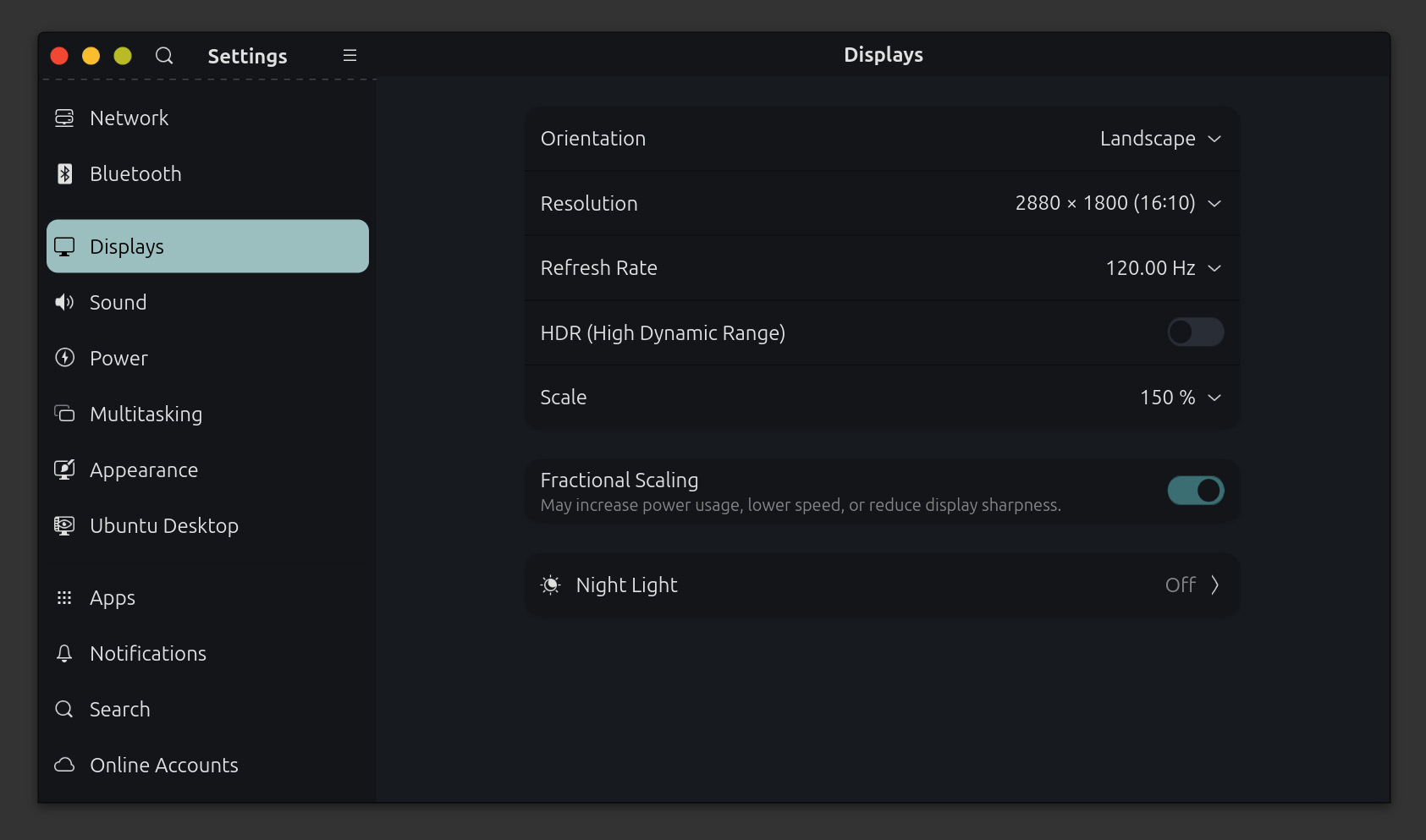
The X1 Carbon 2.8K OLED in operation at 150% scaling.
Peripherals
Because the X1 Carbon was chosen for a portability-oriented workflow, the set of peripherals used routinely is very small. The built-in keyboard is high-quality and the trackpad is adequate, so no external keyboard or mouse is used. For music playback, four HomePod mini units are configured as two stereo pairs, and AirPlay 2 output from the Mac, iPhone, and iPad handles the entire audio chain. AirPlay 2 output from the Linux Desktop to HomePod is not possible for the general user, because Apple's sender implementation is not available[airplay2]This is less a defect specific to the Linux Desktop than a consequence of AirPlay 2 being a closed specification. The RAOP modules in PulseAudio and PipeWire are AirPlay 1 equivalents and are rejected by HomePods, which accept only AirPlay 2. Individual applications such as OwnTone (formerly forked-daapd) do implement AirPlay 2 sending, but their use is limited to playback of a local music library; they are not a means of routing browser or arbitrary application audio to HomePod at the system level., and so it cannot be used for system audio. Bluetooth devices are not routinely used and have not been evaluated.
The only peripheral tried has been a network printer. The machine is an OKI C810dn, connected via a LAN cable to a Buffalo WEX-1166DHPS2 (an Ethernet converter) that joins the same network over Wi-Fi. On macOS the printer was detected and connected through Bonjour; on Ubuntu Desktop likewise, opening Settings > Printers and choosing "Add Printer" made it appear automatically as a candidate via mDNS, and it could be registered without installing any driver. Test printing produced clean output, and the ink levels for all four color cartridges are shown in the settings screen. The combination of CUPS and IPP Everywhere can be operated with ease comparable to macOS, at least for PostScript 3-capable business machines.
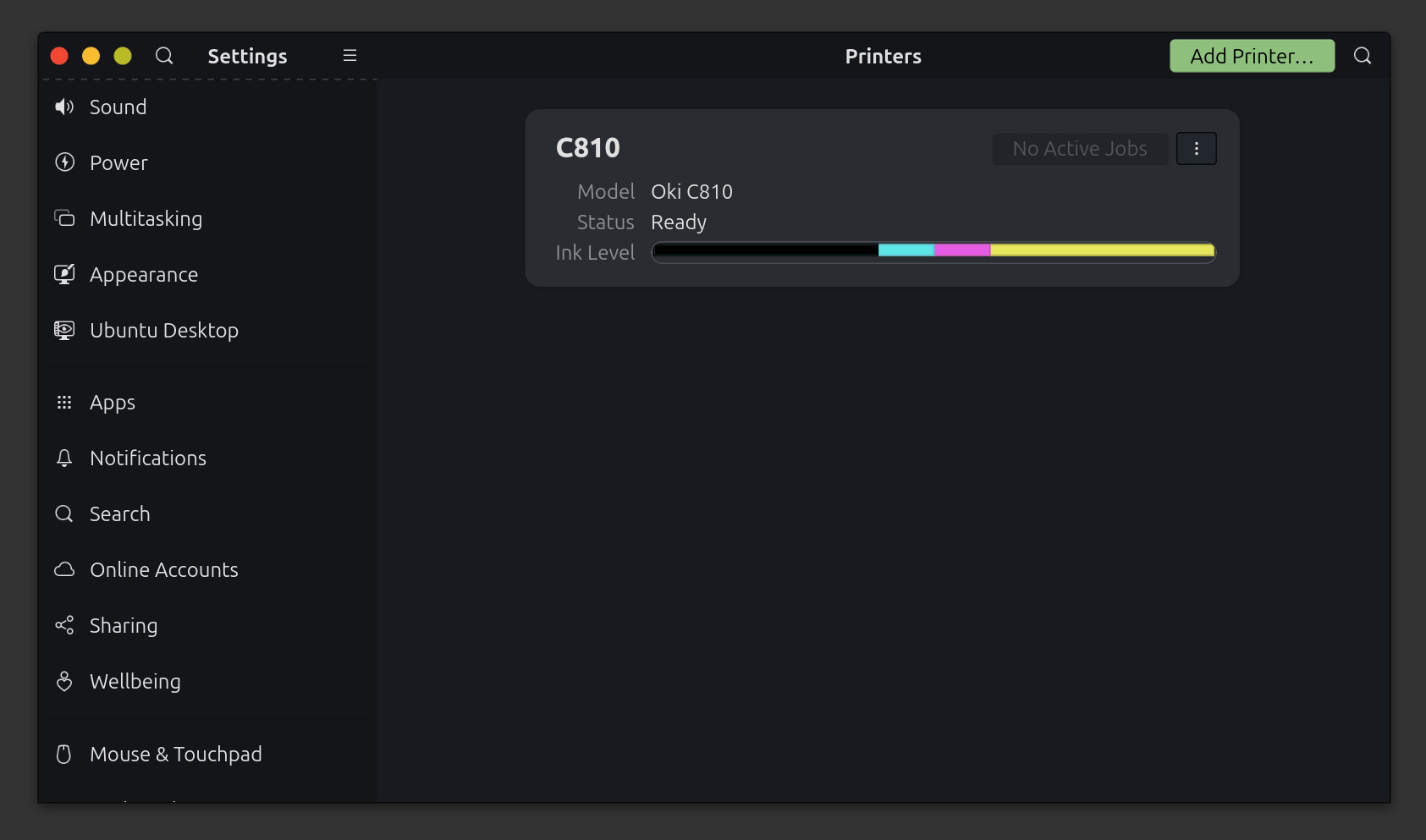
The OKI C810dn added to Settings > Printers, automatically detected via mDNS.
Battery, Power Management, and Wake-from-Sleep
In portability-oriented use, battery life, fan noise, wake from sleep, and tethering behavior govern daily experience. The basis for comparison is the Apple Silicon MacBook Pro, which the author has used in parallel. The battery life of the 13-inch MacBook Pro (M1), adopted immediately after its launch in 2020, was striking on its own; the 16-inch MacBook Pro (M2 Max), to which the author migrated in 2023, lived up to its marketing claim of "the longest battery life in Mac history" and offered truly extraordinary endurance. Current battery performance, affected by aging, no longer feels as impressive as at its peak, yet daily work still presents no complaints. The X1 Carbon's battery consumption gives an impression comparable to this aged MacBook Pro, and it is practical enough for use on the Linux Desktop. Fan noise is nearly inaudible during typical use such as document writing, coding, and browsing. Waking from sleep is fast enough that there is no sense of waiting upon opening the lid.
For power management, Ubuntu 25.10 uses power-profiles-daemon in its standard configuration, switching among power saver, balanced, and performance through GNOME's "Power Mode." Without manually adding TLP, the default setup exhibits consistent behavior. The current state can be checked with the following commands.
systemctl is-active power-profiles-daemon tlp
powerprofilesctl get
On the other hand, some aspects fall short compared with the Mac. One is tethering with the iPhone. With the Mac plus iPhone combination, Personal Hotspot is automatically detected and connected, enabling tethering instantly without touching the iPhone. On the X1 Carbon, whether under Windows or Linux, it is necessary to unlock the iPhone, open the Settings app, and enter the Personal Hotspot screen before the access point becomes active, which introduces modest but persistent friction. This is less a matter of the operating system than of integration within the Apple ecosystem, and it would be harsh to call it a defect of the Linux Desktop per se, but from the perspective of someone who uses a Mac in parallel, the inconvenience remains. Another is battery consumption during sleep. MacBooks consume very little when left unplugged and asleep, with standby rated officially at up to thirty days. This is a strength of Apple Silicon integrated with dedicated power management. The X1 Carbon consumes a meaningful portion of its battery even in sleep within a few days. This behavior is widely reported across Intel platforms using Modern Standby (S0ix), and similar tendencies are observed on Windows as well, not only on Linux. If the machine will not be touched for several days, a clean shutdown is the safer choice.
Each of these differences reaffirms the strength of Apple Silicon's integrated design, and cannot be attributed solely to the Linux Desktop. Still, in daily use, the gap remains perceptible.
Software Assets
From a software perspective, the author uses a 16-inch MacBook Pro (M2 Max), iPad Pro (M5), and iPhone 15 Pro, all tightly dependent on the Apple platform. In addition, a Windows gaming and CAD machine with a Ryzen 9 9950X3D and a GeForce RTX 5080 is used concurrently. In such an environment, the Linux Desktop handles software development well: the terminal, Cursor, Visual Studio Code, and GitKraken all work without issue, and document creation with Logseq, Obsidian, and Typora faces no major obstacles. However, in areas where macOS-only software holds strong positions, either no substitute exists, or the available substitutes are of insufficient quality. Specifically, for Adobe Creative Cloud applications such as Photoshop, Illustrator, InDesign, and Lightroom, some argue for GIMP and Inkscape as candidates, but from the standpoint of someone who has used Adobe products for a quarter century, no practically viable replacement exists. The same applies to DxO PhotoLab and ViewPoint; no substitute can be identified for photo development. For image and video asset management tools such as Eagle or web design software such as Blocs, strong alternatives are likewise scarce. Furthermore, Final Cut Pro and Logic Pro occupy distinctive positions in video editing and music production. For photographers and designers, therefore, use of the Linux Desktop remains extremely difficult. In addition, applications such as Keynote, Notability, Craft, the Monokakido dictionaries, and OmniOutliner, which is used to draft this article, are extremely difficult to replace, and this area is not adequately covered on Windows either. This has, rather, reaffirmed the strengths of the Mac.
By "no substitute" the author does not mean that there is no software offering a subset of the features. For example, the Monokakido dictionaries provide cross-dictionary search over a variety of dictionaries. The author uses the following set of dictionaries (older editions excluded), centered on Japanese-language dictionaries and English-English dictionaries, with thesauri and collocation references alongside. The advantages of the Monokakido dictionaries include offline operation, dictionaries as one-time purchases with the latest editions available, smooth inter-dictionary cooperation, and a common base across the Apple ecosystem.
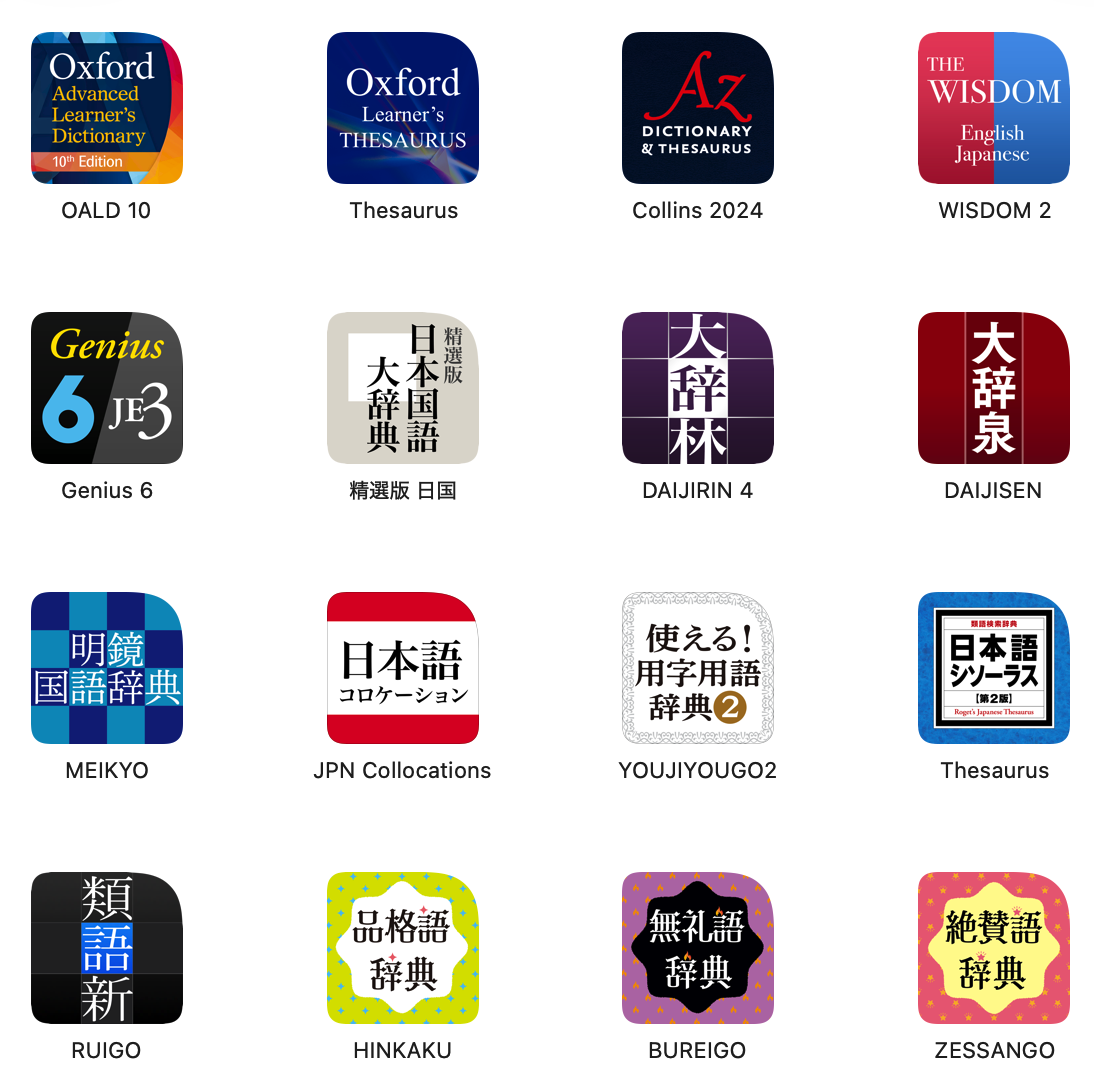
The Monokakido dictionary collection, centered on Japanese and English-English dictionaries with thesauri and collocation references alongside.
Well-known software of the same kind includes GoldenDict-ng and EPWING-compliant viewers, but none of them offer a ready path to acquiring the same lineup of Japanese commercial dictionaries that Monokakido provides. GoldenDict is excellent in offline operation, inter-dictionary integration, and search UI, but it does not appear possible to obtain the latest editions of dictionaries such as Collins, OALD, or the Nihon Kokugo Daijiten through it. For a dictionary program, the dictionaries themselves are the most important element, and this is precisely what is missing in these alternatives. In this article, when what appears to be the core of a product is markedly inadequate, it is described as "having no substitute."
This is less a defect specific to the Linux Desktop than a consequence of AirPlay 2 being a closed specification. The RAOP modules in PulseAudio and PipeWire are AirPlay 1 equivalents and are rejected by HomePods, which accept only AirPlay 2. Individual applications such as OwnTone (formerly forked-daapd) do implement AirPlay 2 sending, but their use is limited to playback of a local music library; they are not a means of routing browser or arbitrary application audio to HomePod at the system level. ↩︎