

6. Overall Assessment — Has the New Year Arrived? —
The conclusion comes first: even in 2026, it is difficult to say that the "Year of the Linux Desktop" has arrived.
What this article has reaffirmed is, more than the progress of the Linux Desktop, the thickness of the integrated design built up within macOS and Apple Silicon. Large-capacity unified memory and wide memory bandwidth that favor the arrival of practical local LLMs, power management that suppresses consumption during sleep, a default security experience constructed on the premise of SIP (rootless) and consumer anti-virus products, restore paths that mesh with QNAP at the protocol layer through Time Machine, and tethering with the iPhone. Individually, none of these is decisive, but in the daily details of operation each contributes, and from 2024 when the X1 Carbon was chosen to the present, this "accumulated lead" has, if anything, widened.
A brief word on Apple Intelligence. Apple's AI strategy is often judged as late, and indeed, compared with the cloud AI frontier or full-fledged local LLMs such as Qwen3 and Devstral Small 2, it lags in both model size and capability. Even so, it is not a minor achievement to have established an environment in which the same local LLM runs by default on every iPhone, iPad, and Mac. Preparing the ground on a platform that ships on the order of hundreds of millions of devices per year, so that the operation of local LLMs can be taken for granted, extends the reach of Apple Silicon's integrated design. In fact, as of 2026, if one were to choose a single new personal machine with local LLMs in mind, the Mac Studio (M3 Ultra) with 512 GB of unified memory and its broad bandwidth would be the first choice (although it has unfortunately been discontinued).
On the other side, the Lenovo ThinkPad X1 Carbon has confirmed strengths of its own. The CFRP chassis and the superb typing action of the keyboard can be praised as pure hardware virtues, but viewed as a platform, the principal strength lies elsewhere: namely, being x86-64 with VT-x/VT-d and vPro Enterprise, and being able to run x86-64 Linux and Windows guests natively through KVM and libvirt. Since Parallels Desktop on Apple Silicon machines can only run aarch64/ARM guests, workloads tilted toward local LLMs benefit from Apple Silicon's unified memory, while workloads tilted toward local virtualization, especially those that require x86-64 guests, favor the X1 Carbon.
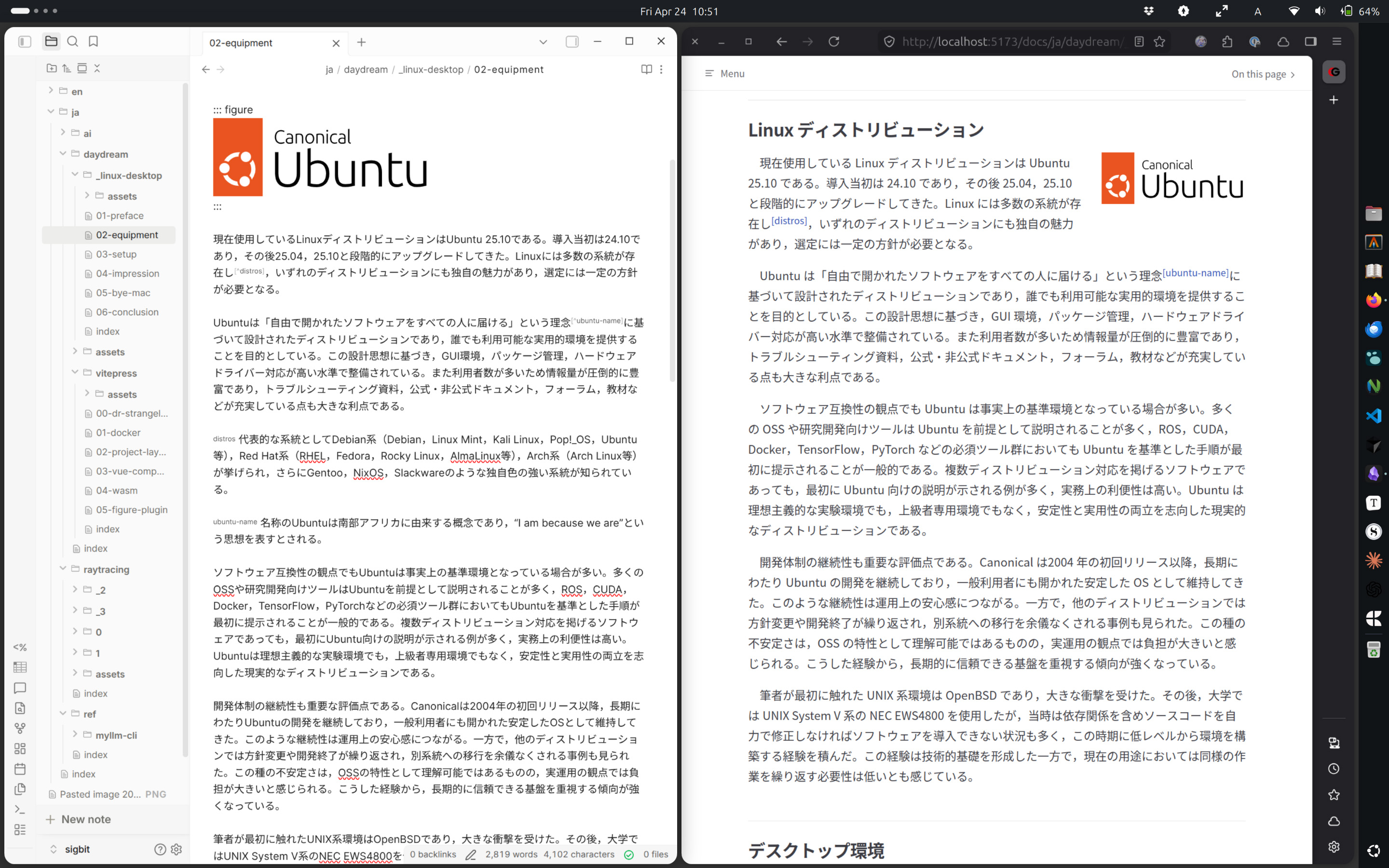
Polishing this article on Ubuntu with Obsidian while checking the VitePress preview in Firefox. The outline is maintained in OmniOutliner on the Mac; drafting and revision are done in Obsidian (synchronized across devices via Obsidian Sync); and final adjustments are made in this Ubuntu environment.
Which users, then, can treat the Linux Desktop as practical? In short, work that is complete within a terminal, editor, browser, and Markdown is a good fit. Concretely, this includes web application developers; engineers in backend, infrastructure, and SRE/DevOps roles for whom the production environment is already Linux; machine learning and data science practitioners who benefit from the richest support for Python, CUDA, and ML frameworks; and researchers and technical writers whose primary tools are TeX and Markdown. Users who wish to run local virtualization on a personal machine, including x86-64 guests, also find the Linux Desktop a viable option. Whether an ordinary PC user in Japan falls within this band is not always the case, but for someone whose daily work does not involve heavy document production that requires Microsoft 365 Apps, whose photo and video editing stays within the range of a hobby, and who combines browser-centric daily use with the specialized uses above, the Linux Desktop is a sufficiently realistic choice.
Conversely, recommending the Linux Desktop to users outside this suitable band on the grounds of avoiding Windows upgrade costs is malicious. The author has, to some degree, begun this new year prepared to arrive at such a conclusion, but cannot recommend the same path to uninformed users. Particular concern is directed toward corporate users who place Microsoft 365 Apps at the core of daily operations, central and local governments, and sole proprietors. In environments where a single phrase in an approval request or the placement of a single arrow in a schematic can sway the decision of an organization, faithful layout reproducibility is itself a business requirement. In that context, LibreOffice (whose governance is now unsettled) and ONLYOFFICE/Euro-Office (currently playing with fire over licensing and brand disputes) have no room to intervene. These are subsets of features, not substitutes, and do not meet the core requirements as described at the end of the previous chapter. The same applies to users in photography, design, video, and music production who have relied on Adobe Creative Cloud, DxO PhotoLab, Final Cut Pro, and Logic Pro; the cost of switching translates directly into the cost of operational breakdown. In addition, for those who have sourced peace of mind from the existence of consumer anti-virus products such as Norton 360, Kaspersky, and ESET, and for those who have taken for granted the unified restore path of Time Machine, a move to the Linux Desktop demands a rearrangement of these very premises.
In short, the Linux Desktop is selective about who it suits. For those whose occupation or workflow fits, it can be a powerful option; for those to whom it does not fit, the first task, before declaring a new year, is to determine whether they actually belong to this suitable band.
The author's operation is converging on a three-platform arrangement of Mac, Windows, and Linux, with carved-out roles assigned to the Linux Desktop. The Windows machine cannot be removed because rendering and games are indispensable. The Linux machine, because production environments are x86-64, plays the role of a highly portable development machine. The Mac remains the hub, bundling photography, design, documents, dictionaries, tethering, backups, and Apple Intelligence. The Year of the Linux Desktop has not arrived, but for a user whose main environment is a Mac, the Linux Desktop does occupy a clear role as an auxiliary working environment. That is the author's present-day conclusion.